Sales prospecting tools are the software you use to find the right people, get contact details you can trust and reach out to them. They fall into five jobs: finding contacts and accounts, enriching records, verifying emails, sequencing outreach and, more recently, AI agents that run the other four from a plain-language brief. No single tool is best at all five. The best setup is usually one tool per job, chosen so each one hands clean data to the next.
So choose by job, not by brand. Decide which jobs you need covered, check what each tool returns and how it charges, then test the handoffs with a small list of your own before you commit. The rest of this guide walks through each job: what to look for, what goes wrong, and three example stacks you can copy.
The five jobs a prospecting stack does
If the process itself is new to you, read what sales prospecting is first. Every outbound motion, from a founder sending 30 emails a week to an agency running ten client campaigns, does the same five jobs in roughly the same order.
| Job | What the tool does | Output you want | What goes wrong |
|---|---|---|---|
| Finding contacts | Searches people and companies by title, seniority, industry, size and location | A list of people, with why each one matched | Stale titles, people who left, filters that are too loose |
| Enrichment | Fills missing fields on records you already have | Current role, company details, a work email | Fields with no date, good data overwritten by bad |
| Email verification | Checks whether an address will accept mail | A clear status per address | Uncertain results reported as valid |
| Sequencing | Sends multi-step emails and follow-ups, tracks replies | Scheduled campaigns, reply handling | Bad addresses sent anyway, domain reputation damaged |
| AI agents | Plans and runs the other steps from a brief | A finished list, with the reasoning shown | No way to see what it did or what it used |
Your CRM sits underneath all of this. It is not a prospecting tool on its own, but it is where results end up, so every tool you pick should be able to write to it (directly, through an automation tool or by CSV).
Finding contacts and accounts
This is the job most people mean when they search for a B2B prospecting tool: a searchable database of people and companies. There are two kinds of search. Account search finds companies by industry, headcount, technology and location. People search finds individuals by title, function and seniority. The reliable pattern is to start with accounts that fit your ideal customer profile, then find the right people inside them.
What to check:
- Filters that match how you describe your customer. If your customer is "RevOps leads at 50 to 200 person fintechs", you need function, seniority, headcount band and industry filters, not just a keyword box.
- Match reasons. A result should say why it is there. Without that, you cannot tell a good match from a fuzzy one.
- Freshness. People change jobs constantly. A tool that cannot tell you when a title was last confirmed leaves you guessing.
- Sourcing. Ask where the data comes from and whether the provider is allowed to use it. Data scraped from behind logins is both a legal risk and a reliability risk.
- How misses are charged. Some tools charge for empty or partial results. Others only count records that come back with data.
Pricing usually follows one of three models:
| Model | How it charges | Suits |
|---|---|---|
| Per-seat licence | A fee per user, often annual | Sales teams where each rep works in a dashboard |
| Credit-based | Credits per export, reveal or record | Occasional, low-volume use |
| Flat monthly with fair-use limits | One fee, with usage limits per time window | Steady or automated use, where credit counting gets in the way |
None of these is wrong. The question is which one stays predictable at your volume.
Enrichment: filling in the gaps
Data enrichment starts from something you already have (a name and company, a domain, a profile URL, an email) and adds what is missing. Common uses are enriching inbound form fills, backfilling empty CRM fields and re-checking old contacts to catch job changes.
What to check:
- Per-field source and date. A job title checked last week is worth more than one checked two years ago, but only if the tool tells you which is which.
- Match rate on your own data. Take 100 records you know well and run them through. Count how many come back, and how many are right.
- Overwrite behaviour. Good enrichment fills gaps and flags conflicts. It should not silently replace a correct value with a worse one.
- Whether emails arrive verified. If enrichment returns emails without checking them, you need a separate verification step before anything goes near your sequencer.
Email verification: the check before you send
Verification tells you whether an address is likely to accept mail. Most tools run a similar sequence: check the syntax, check that the domain has DNS and MX records, then run a mailbox-level check with the receiving server without sending a message. The result is usually one of four labels:
- Valid or verified: the mailbox accepts mail.
- Catch-all: the domain accepts every address, so no one can confirm this specific mailbox. See what a catch-all email is and how to handle one.
- Unknown: the server gave no clear answer.
- Invalid: the address will bounce.
Why it matters: mailbox providers watch how often your messages bounce, and a pattern of hard bounces hurts the reputation of your sending domain. That affects every email you send, not just cold ones.
What to check: whether the tool keeps catch-all and unknown separate from valid (some round uncertain results up), whether it flags role addresses such as info@ and disposable domains, and whether it handles bulk lists. One habit matters more than the tool: verify close to send time, not once at import. Addresses go stale as people leave.
Sequencing and sending
A sequencer sends multi-step campaigns from your mailboxes, schedules follow-ups, stops when someone replies and processes unsubscribes. It is the tool closest to your domain reputation, so it should only ever receive verified addresses, with catch-alls in a separate, lower-volume segment.
What to check: how it imports leads (CSV, API or a direct push), whether it supports custom fields for personalisation, how it handles suppression lists, and how reliably it detects replies. Remember that the rules on outreach apply to you, not your tools. If you are unsure what is allowed where you sell, read whether cold email is legal before your first campaign.
AI agents as a prospecting layer
The newest category is not a database or a sender. It is an AI agent, such as Claude, ChatGPT or Cursor, connected to data tools through an MCP server. You describe your customer in plain language. The agent turns that into filters, calls search, enrichment and verification in order, and hands the result to your sheet, CRM or sequencer.
The benefit is fewer manual steps between tools. The risk is that you cannot see what happened. If you add an agent to your stack, check that:
- results come back as structured data with match reasons and verification status, not just prose
- the agent can read how much usage is left before a big run, so it does not stall halfway
- errors are machine-readable, so the agent knows whether to retry, wait or stop
- you can run a 10-record test before a 500-record run
An agent is only as good as the data it can call. Treat it as a planner on top of the other jobs, not a replacement for them.
How to choose and combine tools
- Write your ICP down first. Industry, company size, region, roles. If you cannot write it in two sentences, no tool will find it for you.
- List the jobs you actually need. A founder sending a few dozen emails a week may need finding, verification and a simple sequencer. A team with a large CRM may need enrichment first.
- Map the handoffs. For each step, write down what format the record leaves in and what the next tool expects. Most stack problems are handoff problems: a missing field, a CSV column that does not map, catch-alls mixed in with verified.
- Test with your own data. Pull 100 accounts you know. Check match rate, title freshness and verification labels by hand on a sample of 20.
- Price it at your real volume. Count records per month, re-checks and empty searches. Compare per-seat, credit and flat models against that number, not against a marketing page.
- Check compliance. Ask about data sources, opt-out handling and, if you sell into the EU, whether a data processing addendum is available.
- Automate last. Run the workflow by hand once, then hand it to an automation tool or an agent.
Example stacks by team
| Team | Find and enrich | Verify | Send | Where results live |
|---|---|---|---|---|
| Founder or small sales team | One data source that searches and enriches, driven by an AI agent | Built into enrichment, plus a re-check before send | A simple sequencer | A spreadsheet or light CRM |
| Outbound agency | A data source without per-seat pricing, one saved ICP per client | A pre-send check on every campaign | One sequencer workspace per client | CSV handoff per client |
| GTM engineer | A data API called from an automation tool or code | Batch verification as an async job | Push to sequencer by API | CRM as system of record |
The common thread: verification sits right before sending in every stack, and every handoff is a format you can inspect.
Where Leadsets fits
Leadsets is a B2B data API and remote MCP server for AI agents. It covers the finding, enrichment and verification jobs, plus company website and careers-page scraping for timing signals such as "hiring SDRs this month". It is not a sequencer or a CRM: it feeds them by CSV, skills and the API. It has no phone numbers yet.
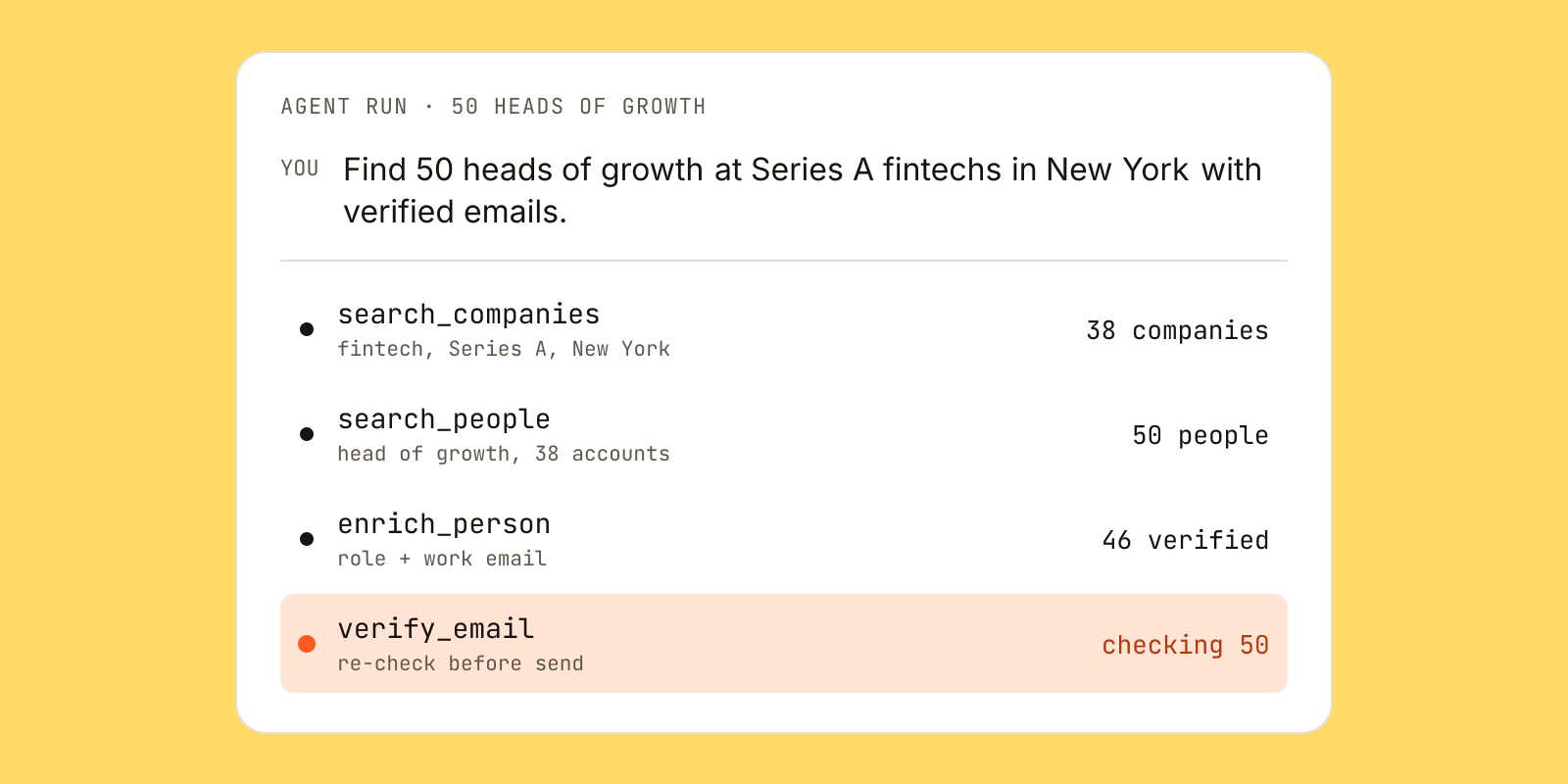
Here is what a small run looks like from Claude with the connector added:
You: Find 50 heads of growth at Series A fintechs in New York
     with verified emails.

search_people   -> 50 people, each with match_reasons   (50 search records)
enrich_person   -> current role + verified work email   (50 enrichment records)
Emails from enrich_person are already verified, so there is no separate verification charge. Records only count when data comes back, and catch-all or unknown addresses are labelled as such, never as valid. One returned record looks like this (fictional example):
{
  "full_name": "Maya Chen",
  "current_role": { "value": "VP Revenue Operations", "checked_at": "2026-11-07" },
  "company": { "name": "Northwind Analytics", "domain": "northwind.co" },
  "work_email": { "value": "maya.chen@northwind.co", "status": "verified", "confidence": 0.94 },
  "match_reasons": ["Revenue operations leader", "Company hiring SDRs"]
}
On Leadsets pricing, the free plan gives 1,000 records once with no card, so this run would use about 100 of them. Paid plans are flat monthly (Solo $29, Pro $99, Team $399, Max $999) with no credits and fair-use limits per five hours and per week. If you want the agent to follow a tested workflow, the free build an outbound prospect list skill runs ICP, search, enrichment and verification in order and keeps catch-alls in their own segment.
Whatever you choose, keep the test small, inspect every handoff, and verify right before you send.
Questions and answers
What are sales prospecting tools?
Sales prospecting tools are software that help you find potential buyers, get their contact details and reach out. They usually cover one of five jobs: finding contacts, enrichment, email verification, sequencing or AI-driven automation. Most teams combine several rather than relying on one.
What is the best B2B prospecting tool?
There is no single best tool, because each one is built for a different job. The best choice is the one that matches your ICP filters, shows how fresh its data is, prices predictably at your volume and hands records cleanly to your next tool. Test candidates on 100 accounts you already know before committing.
Do I need a separate email verification tool?
You need verification somewhere before every send, but it does not have to be a separate product. If your data source returns emails already verified, with catch-all and unknown labelled separately, a re-check before launch may be enough. Old lists and CRM exports should always be verified before use.
Can AI do sales prospecting for me?
An AI agent connected to data tools can turn a plain-language description of your customer into a search, enrich the results and verify emails. It still depends on the quality of the data it calls. Check its output on a small batch first and keep a human review before anything is sent.
How much do sales prospecting tools cost?
Pricing usually follows one of three models: per-seat licences, credit-based billing per record or export, and flat monthly fees with fair-use limits. Which is cheapest depends on how many records you use each month and how often you re-check them. Estimate your real volume before comparing.
What is the difference between a prospecting tool and a CRM?
A prospecting tool finds and prepares new contacts: search, enrichment and verification. A CRM is where you store contacts and track deals and conversations over time. Prospecting tools should feed your CRM, not replace it.
Go deeper
- Web scrapingCareers pages to open roles, homepages to profiles
- GTM skills libraryHiring signal finder and 49 more playbooks
- For AI agentsThe eight MCP tools and example prompts