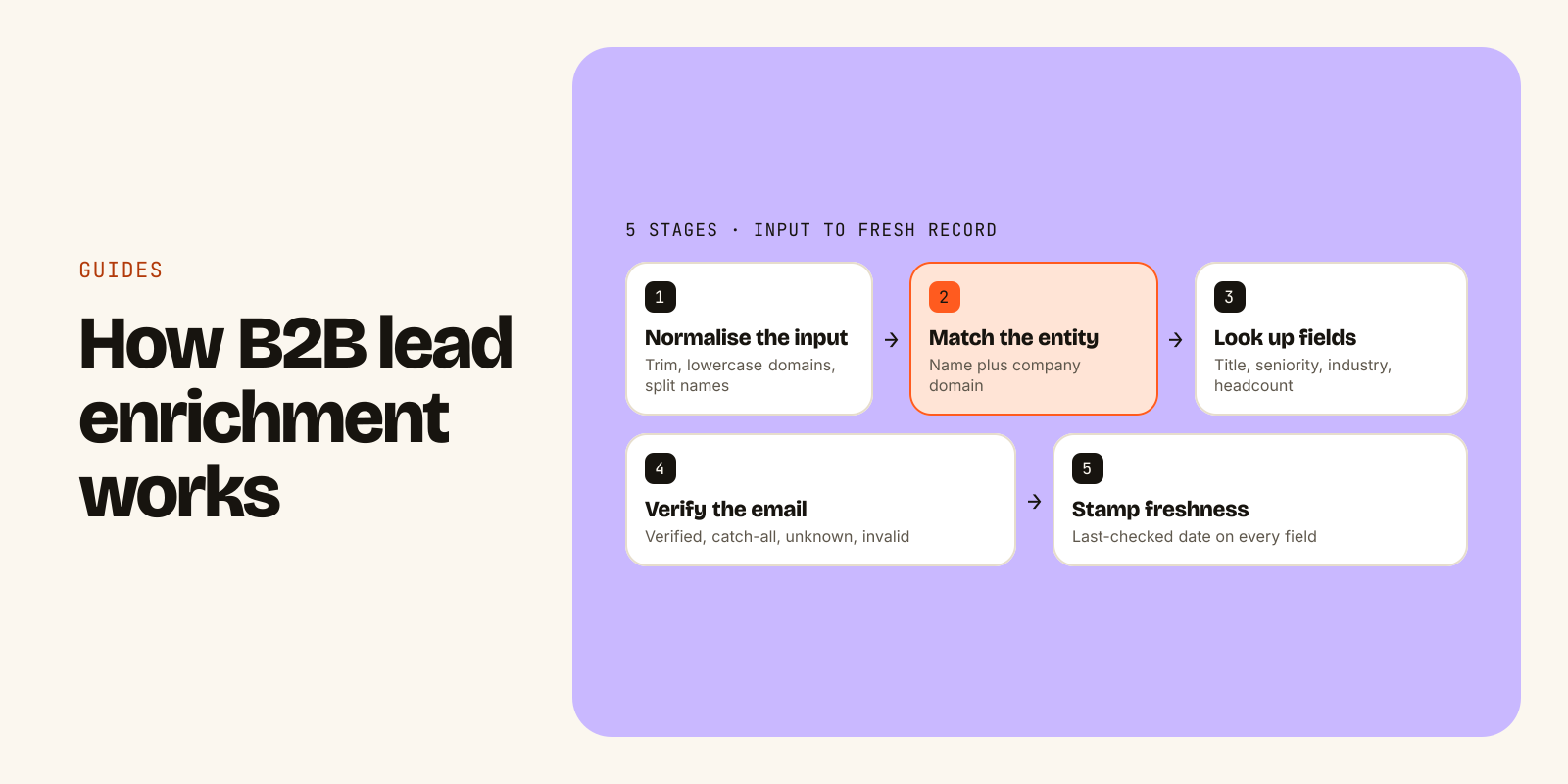
B2B lead enrichment is the process of taking an incomplete lead record and filling in the fields you need to qualify and contact it. You usually start with very little: a name and a company, an email address from a form, or just a website domain. An enrichment source matches that input to a known person or company and returns what is missing, such as current job title, seniority, a work email, and company facts like industry, headcount and location.
Teams enrich leads for three reasons. First, to decide whether a lead fits their ideal customer profile. Second, to route it to the right rep or sequence. Third, to reach the person at an address that will not bounce. You can enrich by hand, with a spreadsheet tool, or by giving an AI agent access to an enrichment API and letting it work through the list. This guide covers what enrichment is, the fields to expect, how it works, what goes wrong, and a full run with an agent.
Data enrichment vs lead enrichment
"B2B data enrichment" is the broad term: adding attributes to any business record, contacts or accounts, wherever it lives (a CRM, a CSV, a data warehouse). "Lead enrichment" is the same process applied to leads, usually new inbound form fills or a fresh outbound list.
Enrichment is often confused with two other jobs. Keep them apart:
- Search (discovery) finds records you do not have yet: "VPs of sales at 50 to 200 person SaaS companies in the US." Enrichment starts from a record you already have.
- Verification tests whether one specific field, usually an email, is correct right now. Enrichment adds fields. Verification checks them.
A sound workflow uses all three in order: search to build the list, enrichment to fill it in, verification before anything is sent.
What fields you get from B2B enrichment
Fields fall into two groups: the person (contact) and the company (account).
| Group | Field | What you use it for |
|---|---|---|
| Person | Full name | Deduping, personalisation |
| Person | Current title | Relevance, routing |
| Person | Seniority and function | ICP fit (a VP in revenue vs an individual contributor in engineering) |
| Person | Current company and domain | Linking the person to the right account |
| Person | Work email and its verification status | Outreach |
| Person | Professional profile URL | Confirming identity |
| Person | Location (city or country) | Territory, time zones, which outreach laws apply |
| Company | Name and domain | The join key for everything else |
| Company | Industry | Segmenting and messaging |
| Company | Headcount band | ICP fit, plan or pricing tier |
| Company | Headquarters location | Territory |
| Company | Technology stack | ICP fit, talking points |
The fields matter less than the metadata attached to them. For every value you want to know three things: where it came from, when it was last checked, and how confident the source is. A job title with no date is a guess. A title checked last week is a fact you can act on.
Some providers also sell phone numbers and personal emails, with coverage and rules that vary by country. What you should not expect, or want, from a B2B source: home addresses or sensitive personal categories. Business contact data is the scope.
How enrichment works under the hood
Whatever tool you use, the steps are roughly the same.
- Normalise the input. Trim whitespace, lowercase domains, strip "www.", split full names. Messy input is the most common reason for a miss.
- Match the entity. For companies, the domain is the strongest key. For people, name plus company domain works well, and an email address or profile URL is better still. Name alone is weak.
- Look up fields. Reputable providers draw on licensed data suppliers and public sources they are permitted to use, such as company websites and careers pages. Some tools query several sources in sequence and take the first good answer, which is often called waterfall enrichment.
- Verify the email. Syntax, DNS and MX checks first, then a mailbox-level check. The honest outcomes are verified, catch-all (the domain accepts everything, so no single mailbox can be confirmed), unknown and invalid.
- Stamp freshness. People change jobs and companies grow or shrink, so B2B data decays. Good sources re-check records on a schedule and tell you when each field was last checked.
What can go wrong
Enrichment fails in predictable ways. Plan for each one before you run a big list.
- Wrong match. There are many people called Maya Chen. If you enrich on name alone you may get the wrong one. Always pass the company domain.
- Stale role. The person left six months ago and the record has not caught up. Check the last-checked date and re-enrich before a campaign, not just at import.
- Uncertain email. Catch-all and unknown are not the same as verified. Send to catch-all at lower volume, hold unknown, and never send to invalid.
- Overwriting good data. An enrichment job that writes over a field a rep corrected by hand destroys information. Fill blanks only, or write new values into separate columns.
- No match at all. Some rows will come back empty. That is normal. Do not retry the same input in a loop.
- Compliance. Enriched data does not change your obligations. You are still responsible for the outreach laws that apply to you (for example CAN-SPAM, GDPR, CASL), for honouring unsubscribes and for keeping your own suppression list.
How to enrich leads with an AI agent
An agent is a good fit for enrichment because the work is repetitive but full of small judgement calls: which key to match on, what to do with a catch-all, whether to trust a value. The example below uses Leadsets, a B2B data API and remote MCP server built for agents. The same pattern works with any enrichment tool your agent can call.
-
Connect the data source. In Claude Code, one command adds the MCP server:
claude mcp add --transport http leadsets \
  https://mcp.leadsets.ai
In Claude on the web or desktop, open Customize, Connectors, + Add, Add custom connector, paste
https://mcp.leadsets.aiand sign in. The MCP setup guide covers Cursor, ChatGPT and other clients. -
Check what you can spend. Ask "What's my Leadsets usage?" The agent calls
get_usage, which costs nothing and returns what is left in the current window and week. -
Give the agent the list and the rules. Be explicit about match keys and about what it may overwrite.
Here is a CSV of 200 inbound leads with name, company and email.
1. Check my usage first and tell me if this run fits the window.
2. Enrich each unique company domain once.
3. Enrich each person, using the company domain as the match key.
4. Verify the email each lead gave us. If it is not verified, use the
   verified work email from enrichment when there is one.
5. Never overwrite a non-empty field. Put new values in columns
   prefixed enriched_.
6. Split the output into tabs: verified, catch-all, unknown, no email.
-
Watch the tool calls. An illustrative run looks like this:
get_usage        enrichment 0 / 1,000 used this window
enrich_company   143 unique domains     131 returned
enrich_person    200 people             168 returned
verify_email     200 submitted emails   200 statuses
-
Read the receipts on each record. Every enriched person comes back with the reason it matched, a verification status, a confidence score and a checked date. Fictional example record:
{ "full_name": "Maya Chen", "current_role": { "value": "VP Revenue Operations", "checked_at": "2026-11-07" }, "company": { "name": "Northwind Analytics", "domain": "northwind.co" }, "work_email": { "value": "maya.chen@northwind.co", "status": "verified", "confidence": 0.94 }, "match_reasons": [ "Revenue operations leader", "Company hiring SDRs" ], "next_review_at": "2026-12-07" } -
Segment and export. Verified addresses go to your main sequence. Catch-all goes to a lower-volume tab. Unknown and no-email rows stay out of sending until something changes.
In the illustrative run above, 32 people and 12 domains returned nothing. Those rows used no records, only requests, and the agent should report them rather than retry them. The data page explains where fields come from and how the four email labels are decided, and the email verification page walks through the checks.
What lead enrichment costs
Enrichment tools tend to use one of three pricing models: credits per record or per field, a licence per seat, or a flat subscription with usage limits. Whichever you compare, ask the same questions:
- Do you pay when a lookup returns nothing?
- Does verifying the email cost extra on top of finding it?
- What happens when you hit a limit mid-run: an error, a surprise bill or a silent stop?
- Can your agent see how much is left before it starts?
For reference, here is how the run above is counted on Leadsets. Each enrich_person or enrich_company result uses one enrichment record, and records only count when data comes back. Emails returned by enrich_person are already verified with no second bill. Standalone verify_email calls count toward the enrichment limit. So the run used 131 + 168 + 200 = 499 enrichment records.
That fits inside one five-hour window on the Solo plan ($29 a month: 1,000 enrichments per five hours, 5,000 per week). Pro is $99 a month for 15,000 per five hours and 75,000 per week. The free plan gives 1,000 records once, with no card. Full numbers are on the pricing page, and limits and costs per call shows exactly what each tool uses.
A checklist before you use enriched leads
Run through this before an enriched list touches a sequencer or your CRM:
- Every person was matched on company domain, not name alone.
- Last-checked dates are recent enough for what you are about to do.
- Verified emails are in the main segment. Catch-all is separate. Unknown is held. Invalid is dropped.
- Your own suppression and unsubscribe lists have been applied.
- No original field was overwritten without a record of the old value.
- Rows with no match are logged, not silently deleted, so you can see your real coverage.
If you want an agent to follow these steps the same way every time, write them down as a playbook. The free GTM skills library includes open-source playbooks for bulk CSV enrichment, stale record audits and pre-send checks that you can use as they are or fork.
Go deeper
- For AI agentssearch_people, enrich_person and the other tools
- PricingFlat monthly plans, 1,000 free records
- Connect via MCPClaude, Cursor, ChatGPT in two minutes