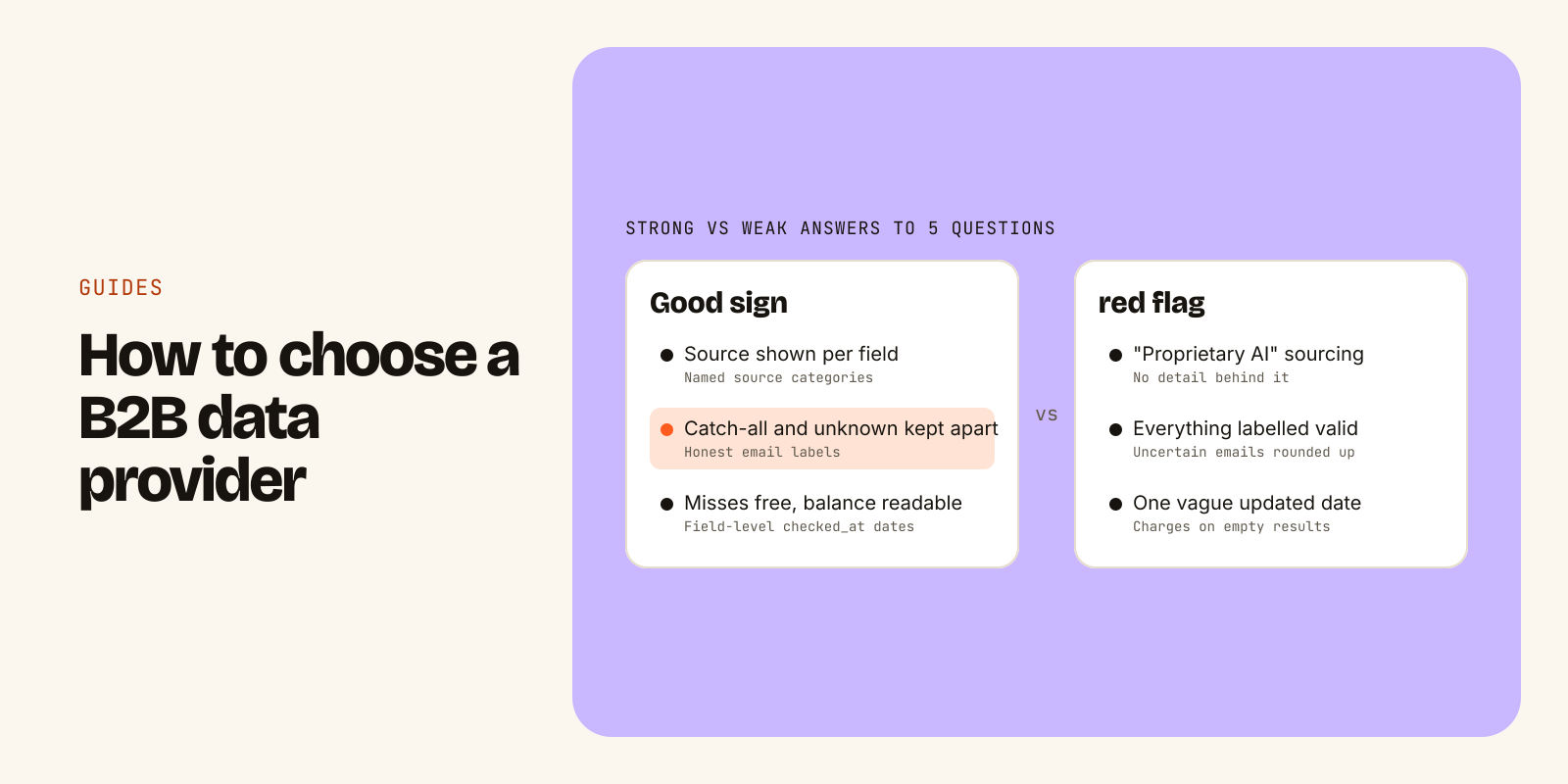
A good B2B data provider can tell you, for every record, where it came from, when it was last checked and how confident it is in the email. A weak one gives you a row and a large database number. So when you compare providers, set the headline record count aside and test five things: sources, freshness, email verification, the pricing model and compliance.
This checklist covers each one: the questions to ask a vendor, the answers that should make you pause, and a small test you can run on your own ICP in an afternoon. It works whether you are buying a dashboard for SDRs, calling an API from n8n or Clay, or giving an AI agent tools to build lists on its own.
Start with what the data is for
Providers are built for different jobs. Before you book any demos, write down which of these you actually need:
- Prospecting: finding new people and accounts that match your ICP.
- Enrichment: filling in missing roles, emails and firmographics on records you already have, such as your CRM.
- Verification: checking whether a list of emails is safe to send to.
- Signals: knowing when an account is worth contacting now, for example because it is hiring for a role you sell to.
Then note who or what will consume the data. A sales team wants search filters and exports. A GTM engineer wants a documented REST API with clear errors. An AI agent wants structured responses it can reason over and a way to check its remaining budget before a long run.
Also list hard requirements, such as phone numbers or a specific region, because not every provider covers them. Three must-haves on paper will save you from being sold on features you won't use.
Check where the data comes from
Every provider assembles data from some mix of sources. Common ones are licensed data suppliers, public sources such as company websites and careers pages, and contributory networks where users share contacts in exchange for access. Each has trade-offs, so you want a straight answer about which ones are used.
Questions to ask:
- What categories of sources do you use, and are you permitted to use each one?
- Is any data collected from behind a login or a paywall?
- Can I see the source for an individual field, not just the record?
- When two sources disagree about a person's title or company, what happens?
Good answers name source categories and show the source on each field. Be wary of vague answers like "proprietary AI" with nothing behind them, or any hint of data scraped from logged-in pages. That kind of sourcing creates legal risk, and some of that risk becomes yours once you send to the contacts.
Ask how fresh the data really is
B2B data goes stale constantly. People change jobs, get promoted, and companies rebrand or get acquired. A record that was right last year can send your sequence to someone who left. Freshness is often the difference between a list that works and one that bounces.
The trap is a single "updated" timestamp on a record. Re-fetching an old fact does not make it new. Ask for dates at the field level, and ask what each date means: when a field was last checked against a source and when an email was last verified are two different things.
A record with useful freshness data looks something like this (fictional example):
{
  "full_name": "Maya Chen",
  "current_role": { "value": "VP Revenue Operations", "checked_at": "2026-11-07" },
  "company": { "name": "Northwind Analytics", "domain": "northwind.co" },
  "work_email": {
    "value": "maya.chen@northwind.co",
    "status": "verified",
    "confidence": 0.94
  }
}
Questions to ask: how often is every record re-checked, are fast-changing fields re-checked more often, and can I filter or sort by last-checked date? If the vendor cannot answer the first question with a schedule, assume the answer is "rarely".
Look hard at email verification
Bad emails do more than waste a send. Bounces hurt your sender reputation, which affects whether your good emails reach the inbox. So how a provider verifies emails, and how honestly it labels the results, matters more than how many emails it claims to have.
Most serious verification follows a waterfall: syntax checks, then DNS and MX records for the domain, then a mailbox-level check with the mail server, sometimes with a second verifier for uncertain results. The weak point is the uncertain middle. Some domains accept mail for any address (catch-all), and some servers give no clear answer. A provider that rounds those up to "valid" makes its numbers look better and your bounce rate worse.
| Label | What it means | What to do |
|---|---|---|
| Verified | The mailbox accepts mail | Send |
| Catch-all | The domain accepts everything, so no one can confirm the mailbox | Send at lower volume, segment separately |
| Unknown | The server gave no clear answer | Treat as unconfirmed |
| Invalid | The address bounces | Do not send |
Questions to ask:
- Do you return catch-all and unknown as separate labels, or fold them into valid?
- Do you ever return invalid emails as contact emails?
- Is verification included when you return an email, or billed as a separate step?
- When was each email last verified, and is that date in the response?
- Do you publish how you measure accuracy, including errors?
That last one is worth pushing on. A method you can read beats a percentage you can't check, and no provider can honestly promise every email is deliverable. For a worked example of the four labels, see how the Leadsets verification waterfall handles each step.
Compare pricing models, not just prices
Two providers with the same monthly price can cost very different amounts once you run real workloads. The model matters as much as the number.
| Model | How you pay | Watch for |
|---|---|---|
| Per-seat subscription | A fee per user per month | Export caps, seats nobody uses, agents and scripts that don't map to a "seat" |
| Credit-based | Buy credits, each action spends some | Different actions cost different credits, credits that expire, credits spent on misses |
| Pay per record | A price per contact or email returned | Costs that scale with every loop or retry, hard-to-predict bills |
| Flat monthly with fair-use limits | A fixed fee, usage capped per time window | What the limits actually are, and what happens when you reach one |
Whatever the model, ask the same questions:
- Does an empty search or a failed lookup cost anything?
- Is email verification included or charged separately?
- What happens at the limit: a hard stop, an overage bill or a throttle?
- Can my code or agent read the remaining balance before it starts a run?
- If a request times out and I retry it, can I be charged twice? (Look for idempotency keys in the API docs.)
The last two matter most if you automate. An agent that loops over a list can burn through a budget fast if every retry and every miss is billed.
Check compliance before your legal team does
You are responsible for how you use contact data, but your provider's practices decide how much risk you inherit. Ask for documents, not reassurance.
- Lawful basis: for EU and UK data, how does the provider justify processing under GDPR? A documented legitimate-interest assessment is a common answer.
- Opt-out: can anyone remove themselves without creating an account, and are suppressed records kept out of results permanently?
- CCPA/CPRA: how are "do not sell or share" requests handled?
- DPA: is there a data processing addendum, with standard contractual clauses for international transfers?
- Subprocessors: is there a published list?
- Security: encryption in transit and at rest, access controls, audit logs.
- Certifications: if a vendor mentions SOC 2, ask for the report. "Planned" and "certified" are different things.
- Scope: business contact data only, with no sensitive categories or home addresses.
Even with a clean provider, you still have to follow the outreach laws that apply to you (for example CAN-SPAM, GDPR or CASL), honour unsubscribes and keep your own suppression list. This is a checklist, not legal advice.
Run a test on your own ICP
Demos use the provider's best examples. Your test should use yours.
- Pick 30 to 50 accounts you know well, such as current customers or recent deals, where you already know who the right contacts are.
- Write one ICP description and run the same search with each provider.
- Read the results. Does every person fit, and does the provider say why each one matched?
- Compare against what you know. Are roles current? Did it miss obvious people?
- Count the email labels: verified, catch-all, unknown, invalid. Ignore the total.
- Write down what the test used: records, credits or requests, including any charged for empty results.
- Spot-check the receipts: is there a source and a date on each field?
Here is what that looks like with Leadsets, the B2B data API and remote MCP server we build at Mobylogix. The free plan gives 1,000 records one time, no card, which is enough for this test. In Claude, Cursor or another MCP client connected to https://mcp.leadsets.ai, you can ask:
Find 25 VPs of Sales at US B2B SaaS companies with 50 to 200 employees.
Only include people with a verified work email. Show the match reasons
and the checked_at date for each email, and tell me how many records this used.
Or call the REST API directly:
curl https://api.leadsets.ai/v1/people/search \
  -H "Authorization: Bearer $LEADSETS_KEY" \
  -d '{ "title": ["VP Sales"], "country": ["US"], "employees": "50-200",
        "has_verified_email": true, "limit": 25 }'
Each result carries match reasons, an email status and a checked date, and every response includes a usage object showing what was counted and what is left. Records count only when data comes back, so an empty search uses none, though every call counts as a request. Over a limit you get a 429 with a retry time, and the blocked call counts against nothing. The details are in limits and costs. What it won't give you: phone numbers, which Leadsets does not offer yet.
The checklist
| Area | Ask | Good sign | Red flag |
|---|---|---|---|
| Use case | What will consume the data? | Fits your workflow (dashboard, API or agent) | You're paying for a different job |
| Sources | Where does each field come from? | Named categories, source per field | "Proprietary" with no detail, logged-in scraping |
| Freshness | When was this field last checked? | Field-level dates, a re-check schedule | One vague "updated" date |
| Verification | How are uncertain emails labelled? | Catch-all and unknown kept separate | Everything is "valid" |
| Pricing | What does a miss or a retry cost? | Misses free, balance readable, safe retries | Charges on empty results, surprise overages |
| Compliance | Can I see the DPA and opt-out? | Published documents, public opt-out | Badges without reports |
Leadsets publishes its own answers to these questions on its data sourcing page, pricing page and compliance page. Hold any provider, including us, to the same list.
Go deeper
- For AI agentssearch_people, enrich_person and the other tools
- PricingFlat monthly plans, 1,000 free records
- Connect via MCPClaude, Cursor, ChatGPT in two minutes