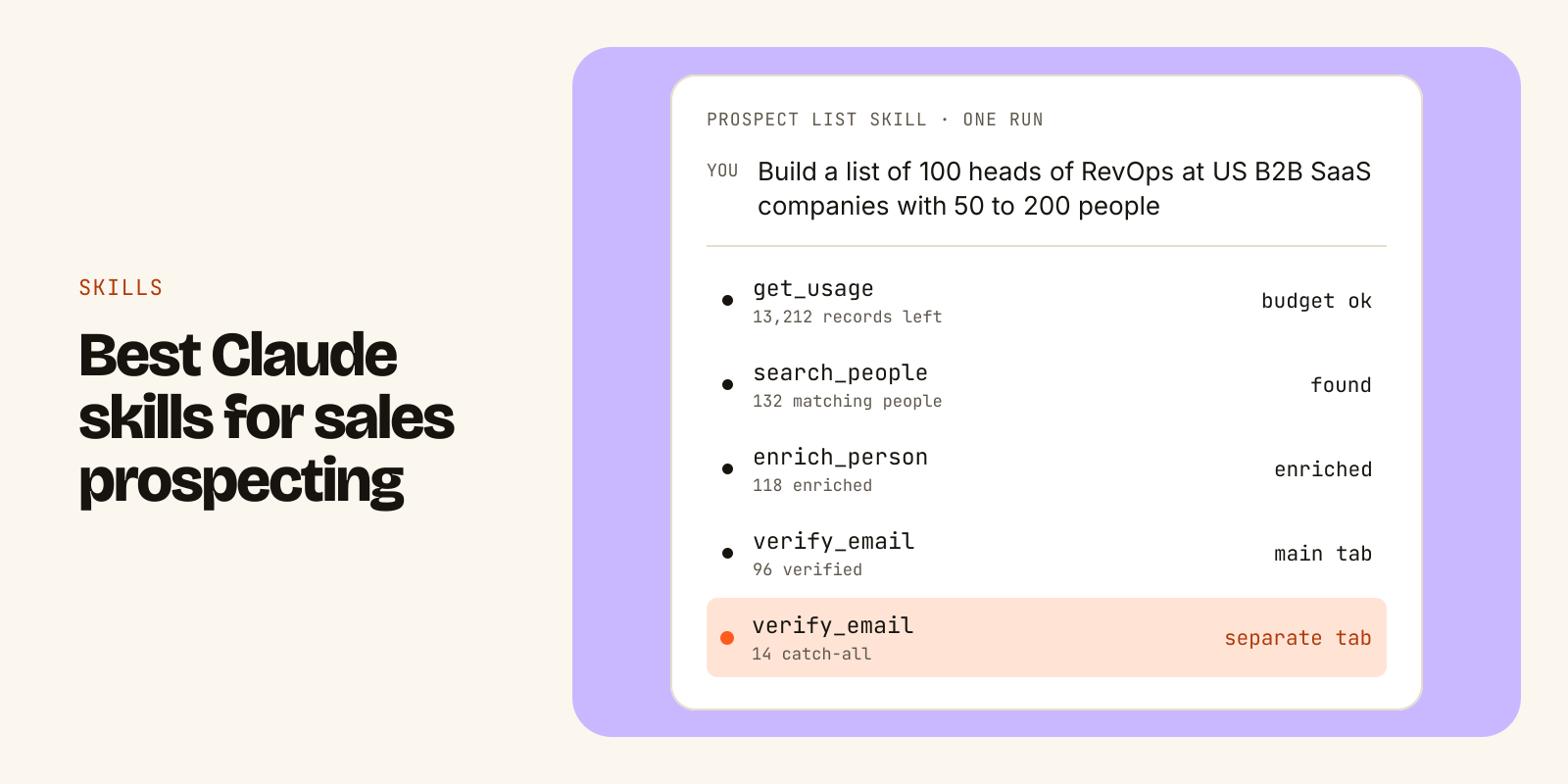
The best Claude skills for sales prospecting each encode one workflow you already repeat: building a prospect list from an ICP, cleaning a list before you send, finding companies with a hiring signal, backfilling missing emails in your CRM, and running a final check before a campaign launches. A good skill tells Claude which tools to call, in what order, how to check the result and what to hand back. A weak one is a long prompt in a folder.
A skill is a folder with a SKILL.md file inside. You install it by uploading the folder in Claude (Settings, Skills) or by placing it in your Claude Code skills directory. Write your own once you notice you are pasting the same instructions into chats every week, or when your rules (ICP, exclusions, output columns) are specific enough that no public skill will match them.
The rest of this post covers how skills work, how to judge one, a shortlist by job, installation steps, and a template for writing your own.
What a SKILL.md skill is
A skill is a playbook Claude can load when a task calls for it. The folder holds one required file, SKILL.md, and can also hold reference files, templates or scripts.
SKILL.md starts with a short block of YAML frontmatter, then plain Markdown instructions:
---
name: clean-list-before-sending
description: Verifies every email in a list and splits it into send-safe, catch-all, unknown and invalid segments. Use when the user is about to send a campaign or uploads a contact list.
---

# Clean a list before sending

1. Read the list and find the email column.
2. Verify every address.
3. Return four segments with counts.
The name and description matter most. Claude reads the description first to decide whether the skill applies, and only reads the full instructions when it does. That keeps many skills installed without crowding every conversation. It also means a vague description ("helps with sales") gets a skill ignored or loaded at the wrong time.
Two things a skill is not:
- It is not a data source. A skill can say "search for VPs of Sales at 50 to 200 person SaaS companies", but Claude still needs a tool that can run that search. In practice that means an MCP server or an API the agent can call.
- It is not magic accuracy. A skill makes a workflow repeatable. If the data behind it is stale, the skill repeats the staleness faithfully.
What makes a GTM skill worth installing
Before you add any skill, open the SKILL.md and check it against this list.
| Check | What good looks like | Red flag |
|---|---|---|
| Description | Says what it does and when to use it, in one or two sentences | Generic ("sales assistant") |
| Tool order | Names each tool and the order to call them | "Find leads" with no method |
| Budget step | Checks limits or cost before a big run | Starts pulling 5,000 records blind |
| Sanity check | Tests filters on a tiny sample first | Runs the full query on the first try |
| Email handling | Keeps catch-all and unknown separate from verified | Treats every found address as sendable |
| Output | Fixed columns and a destination (CSV, sheet, CRM) | Free-form prose |
| Failure report | Says what it could not confirm | Silent gaps |
The email row deserves a note. A catch-all domain accepts every address, so nobody can confirm a specific mailbox exists. An unknown result means the mail server gave no clear answer. Sending at full volume to either group raises your bounce rate and can hurt your sending domain. A skill that merges them into "valid" is doing you harm.
The best Claude skills for prospecting, by job
Full disclosure: the skills below come from the Leadsets library, which we publish. There are 50 of them, free and MIT-licensed, and you can read every SKILL.md before installing. They call Leadsets tools (search, enrichment, verification, scraping), so they need a Leadsets connection to run. The structure is still worth copying if you use a different data source.
Pick by the job you do most often:
| Job | Skill | Tools it calls | Why it is useful |
|---|---|---|---|
| Build a list from scratch | Build an outbound prospect list | search_companies, search_people, enrich_person, verify_email | ICP to send-ready list, catch-alls on a separate tab |
| Clean before sending | Clean a list before sending | verify_email | Four segments instead of one "valid" bucket |
| Last check before launch | Pre-send campaign check | verify_email | Pauses risky contacts in a loaded campaign |
| Timing | Companies hiring SDRs | search_companies, scrape_jobs, search_people | Hiring posts with dates, plus who runs sales |
| Research one account | Account research brief | scrape_company, enrich_company | One page: what they sell, to whom, angles to open with |
| Personalization | Personalized first lines | scrape_company, scrape_jobs | One true opening line per prospect, from their own site |
| CRM hygiene | HubSpot email backfill | enrich_person, verify_email | Finds missing or bounced emails and writes verified ones back |
| Stale data | Job-change detector | enrich_person | Flags contacts who changed role or company |
| Big jobs | Usage planner | get_usage | Splits large runs across limit windows so they do not stall |
If you only install one, start with the outbound prospect list skill. It covers the full path from ICP to export and shows the habits a good skill should have: confirm the brief, check the budget, probe with one record, then run. The full list of 50 GTM skills covers enrichment, company research, outreach handoff and agency workflows.
How to install a Claude skill
In Claude (web and desktop)
-
Download the skill folder. For the Leadsets library you can clone everything at once:
git clone https://github.com/leadsets/leadsets-skills
-
Open Claude, go to Settings, then Skills, and upload the folder for the skill you want.
-
Connect the data source the skill expects. For Leadsets skills, add
https://mcp.leadsets.aias a custom connector (Customize, Connectors, + Add, Add custom connector), then sign in. It uses OAuth, so there is no key to paste. The MCP setup guide covers Claude, Claude Code, Cursor and ChatGPT. -
In a chat, switch the connector on (+, Connectors) and ask "What's my Leadsets usage?" If Claude calls
get_usageand answers with numbers, you are connected. -
Ask for the outcome in plain language. You do not need to name the skill.
In Claude code
Put the skill folder in ~/.claude/skills/ to use it everywhere, or in .claude/skills/ inside a project to share it with that repo. Add the data connection with one command:
claude mcp add --transport http leadsets \
  https://mcp.leadsets.ai
What a run looks like
Here is the prospect list skill on a real-shaped request. The output is illustrative.
You: Build a list of 100 heads of RevOps at US B2B SaaS companies
with 50 to 200 people. Put it in a Google Sheet.

Agent:
✓ ICP confirmed  ·  ✓ 13,212 enrichment records left this window
✓ 132 matching people  ·  ✓ 118 enriched
✓ 96 verified  ·  14 catch-all (separate tab)  ·  8 no email
→ Sheet "RevOps leads to Nov" created, 3 tabs
Notice what the skill reports: it asked for 100, found 132, enriched 118, and only 96 came back verified. It says so instead of padding the list. That gap is normal in B2B data, and a skill that hides it will cost you later in bounces.
What it costs: search uses one record per person returned and enrichment uses one record per person enriched. Emails from enrichment are already verified, so there is no separate verification charge. This run used roughly 250 records. The free plan gives 1,000 records once, with no card, so you can try one or two runs on your own ICP before deciding anything. Paid plans are flat monthly prices with limits per five hours and per week, explained on the limits and costs page.
When to write your own skill
Public skills are a starting point. Write your own when one of these is true:
- You paste the same instructions into Claude more than a few times a week.
- Your ICP has rules a generic skill cannot know (excluded industries, existing customers, territories).
- Your output has to match a fixed format, such as the columns your sequencer imports.
- You want the same checks every time, regardless of who on the team runs it.
The easiest path is to fork an existing skill and edit it. Here is a template for a team selling to RevOps leaders (the example persona is Maya Chen, VP Revenue Operations at Northwind Analytics, a fictional company):
---
name: revops-prospect-list
description: Builds a send-ready list of VP or Head of RevOps contacts at US B2B SaaS companies with 50 to 200 employees. Use when the user asks for new prospects, leads or a list to load into a campaign.
---

# RevOps prospect list

## Before you start
1. Call get_usage. If fewer records are left than the list size, say so and offer to split the run.
2. Confirm list size (default 50) and destination (CSV or Google Sheet).

## Steps
1. Run search_people with limit 1 to check the filters return the right kind of person.
2. Run the full search: function revenue, seniority vp or head, employees 50-200, country US, industry saas.
3. Drop anyone whose company domain is in exclusions.csv (current customers and open deals).
4. Run enrich_person on the rest.

## Rules
- Only verified emails go in the main tab.
- Catch-all goes in a separate tab. Unknown and missing go in a third.
- Never guess an email address.

## Output
Columns: full_name, title, company, domain, email, email_status, match_reasons, checked_at.
End with counts: found, enriched, verified, catch-all, no email.
Three tips for writing it:
- Spend the most time on the description. Include the words people will actually type: "prospects", "leads", "list".
- Put numbers in the rules. "Small test first" is vague. "limit 1" is not.
- Keep reference data in files. An
exclusions.csvin the folder beats a list pasted into the instructions, and it is easier to update.
Test it on a small run, read the output, then tighten the rules that let something through.
What can go wrong
- The skill never triggers. The description is too vague or does not mention the words you use. Rewrite it with the request you actually type.
- The skill triggers but nothing happens. The data connector is off in that chat. Turn it on and check with a usage question.
- The run stops halfway. You hit a limit window. A good skill checks budget first; with Leadsets, a blocked call returns a 429 with a retry time and counts against nothing, so the agent can wait and resume.
- The list looks full but bounces. The skill treated catch-all or unknown as valid. Fix the rules so those land in separate tabs.
- Two skills fight. Overlapping descriptions make Claude pick the wrong one. Narrow each description to one job.
Start with one skill that matches the job you do most, read its SKILL.md before you run it, and fork it the first time your own rules get in the way. The skills library is the quickest place to find one to copy.
Go deeper
- For AI agentssearch_people, enrich_person and the other tools
- PricingFlat monthly plans, 1,000 free records
- Connect via MCPClaude, Cursor, ChatGPT in two minutes