A good B2B cold email template is short, built around one reader's likely problem, gives a reason to talk now, and ends with one easy question. Below are ten cold email templates you can adapt: three first-touch emails, three trigger-based emails (including a hiring signal), three follow-ups and a breakup. Each one says when to use it and why it works. After the templates you get subject lines, personalization rules and the checks to run before you send.
If you are new to the format, a cold email is a one-to-one message to someone you have no prior relationship with. Templates help you move faster, but the reader only responds to the parts that are true about them. Every example below is written by a fictional rep, Sam, at Stackfold (a made-up pipeline reporting tool) to Maya Chen, VP Revenue Operations at Northwind Analytics (also fictional). Swap in your own product, reader and reason.
What every template here has in common
The ten emails look different, but they follow the same rules. If you change a template, keep these intact.
- One reader, one problem. Write to a role you understand, about a problem that role actually owns. If you cannot name the problem in one sentence, your ideal customer profile needs work before your copy does.
- A reason for now. A new hire, a launch, a change on their site. Without one, you are asking for attention with nothing to earn it.
- Short enough to read on a phone without scrolling. Three or four short paragraphs at most.
- One low-effort ask. A yes-or-no question beats a request for 30 minutes on their calendar.
- Plain text. No images, attachments or tracking-heavy formatting in the first touch. They add little and can hurt delivery.
For the craft behind each line (openers, value statements, calls to action), see how to write a cold email.
First-touch templates
Use these when you have no specific event to point to, only a good fit between your product and their role.
Template 1: the problem-first opener
When to use it: you know the role well and the problem is common to it.
Subject: friday pipeline report

Hi Maya,

A lot of RevOps leads spend part of every Friday rebuilding the same
pipeline report from three exports, because the CRM view never matches
what the CRO asks for.

Stackfold builds that report from your CRM and keeps it current, so the
Friday rebuild goes away.

Is that a problem at Northwind, or have you already solved it?

Sam, Stackfold
Why it works: it describes a specific, recognisable chore before it mentions the product. The closing question accepts "already solved" as an answer, which makes replying easy.
Template 2: the similar-team opener
When to use it: you have worked with companies like theirs and can say so truthfully.
Subject: forecast calls at 50 to 200 person SaaS teams

Hi Maya,

I work with RevOps teams at B2B software companies around Northwind's
size. The pattern I hear most: the forecast call turns into a debate
about whose spreadsheet is right.

Stackfold gives everyone the same pipeline numbers, straight from the CRM.

Worth a 15-minute look, or not a priority this quarter?

Sam, Stackfold
Why it works: it signals relevance without a case study. Only name customers or describe your client base if it is accurate and you have permission.
Template 3: the observation opener
When to use it: their website tells you something concrete about how they sell.
Subject: selling to distributors

Hi Maya,

Northwind's homepage says you sell to mid-market distributors. Those
deals often involve several sites and long evaluations, which makes
stage-by-stage reporting harder than it looks.

Stackfold tracks multi-stakeholder deals by stage without manual tagging.

Is deal-stage reporting something you are working on this year?

Sam, Stackfold
Why it works: the first line proves you looked, and the second connects the observation to a problem. That link is what separates research from decoration.
Trigger-based templates
Triggers are events that make a problem more likely or more urgent. They give you the "why now" for free.
Template 4: new leader
When to use it: the reader started a new role in the last few months.
Subject: first months at northwind

Hi Maya,

Congratulations on the VP Revenue Operations role. New RevOps leaders
are often asked for a trustworthy pipeline baseline early on, before
anyone agrees on the numbers.

Stackfold builds that baseline from the CRM you already have.

Would a look at what that baseline includes be useful?

Sam, Stackfold
Why it works: new leaders are reviewing tools and processes anyway. You are offering help with a task they are likely to be given.
Template 5: hiring signal
When to use it: the company is hiring for roles that create the problem you solve.
Subject: your sdr hiring

Hi Maya,

Saw Northwind is hiring SDRs and a RevOps Manager on your careers page.
More reps usually means more pipeline to track and more questions about
where it came from.

Stackfold attributes pipeline by rep and source automatically.

Is reporting on the new team on your list yet?

Sam, Stackfold
Why it works: job posts are public, dated and specific. A company paying to hire SDRs has budget for growth and a problem about to get bigger. Check the posting date before you send: a role posted months ago may already be filled.
Template 6: product launch
When to use it: the company announced a new product, market or pricing model.
Subject: the supplier portal launch

Hi Maya,

Northwind's site now features the supplier portal next to the inventory
product. A second product usually means a second pipeline, often with
different stages and owners.

Stackfold reports on both from one CRM, side by side.

Are you tracking them separately yet?

Sam, Stackfold
Why it works: launches create operational work that nobody planned for. You are naming the second-order problem, not congratulating them on the first.
Follow-ups and the breakup
Most replies to a sequence do not come from the first email, so plan follow-ups before you send the first touch. Space them a few business days apart and make each one useful on its own. For context on what results to expect, see what a good cold email reply rate is.
Template 7: follow-up with something useful
Subject: re: friday pipeline report

Hi Maya,

One quick check on the Friday report: compare the open opportunity count
in your CRM with the count in last week's deck. If they differ, someone
is rebuilding the report by hand.

Happy to send the short checklist we use for that audit. Want it?

Sam
Why it works: it gives value whether or not they buy, and the ask is smaller than a meeting.
Template 8: the right-person check
Subject: who owns pipeline reporting?

Hi Maya,

I may have the wrong person. Who at Northwind owns the weekly pipeline
report? If it's you, I'll keep it short. If not, a name is all I need.

Sam
Why it works: it is easy to answer and respects their time. Use it when you are unsure the role owns the problem.
Template 9: the short bump
Subject: re: your sdr hiring

Hi Maya, bumping this in case it got buried. Is reporting for the new
SDR team something you're looking at this quarter? A yes or no is fine.

Sam
Why it works: it replies in the same thread, so the context is one scroll away, and it lowers the bar to a single word.
Template 10: the breakup
Subject: closing the loop

Hi Maya,

I haven't heard back, so I'll assume pipeline reporting isn't a
priority right now and stop here. If that changes, reply to this thread
and I'll pick it up.

Thanks for reading,
Sam
Why it works: it ends the sequence politely and leaves the door open. Then actually stop. Do not send a "breakup" followed by three more emails.
Subject lines that match each template
Short, lowercase, internal-sounding subject lines tend to look like a colleague wrote them. Avoid fake "re:" on a first touch, all caps and urgency words.
| Template | Example subject | Why it fits |
|---|---|---|
| Problem-first | friday pipeline report | Names the chore, not the product |
| Similar team | forecast calls at 50 to 200 person SaaS teams | Signals relevance to their segment |
| Observation | selling to distributors | Points at their business |
| New leader | first months at northwind | Personal and timely |
| Hiring signal | your sdr hiring | Refers to a public, recent fact |
| Product launch | the supplier portal launch | Refers to their news |
| Follow-ups | re: original subject | Real thread, real context |
| Right person | who owns pipeline reporting? | A question they can answer in one line |
| Breakup | closing the loop | Clear and final |
Personalization that stays true
Personalization is not inserting a first name and a company name. It is one sentence that is true, recent and connected to the problem in the email. Four rules:
- Verifiable. Use facts from their website, careers page or public announcements. Never invent "loved your recent post" lines.
- Recent. A hiring post from this month is a signal. One from last year is noise.
- Connected. Every personal line should lead into the problem sentence. If you could delete it without changing the email, it is decoration.
- One line is enough. Two paragraphs of research reads like surveillance.
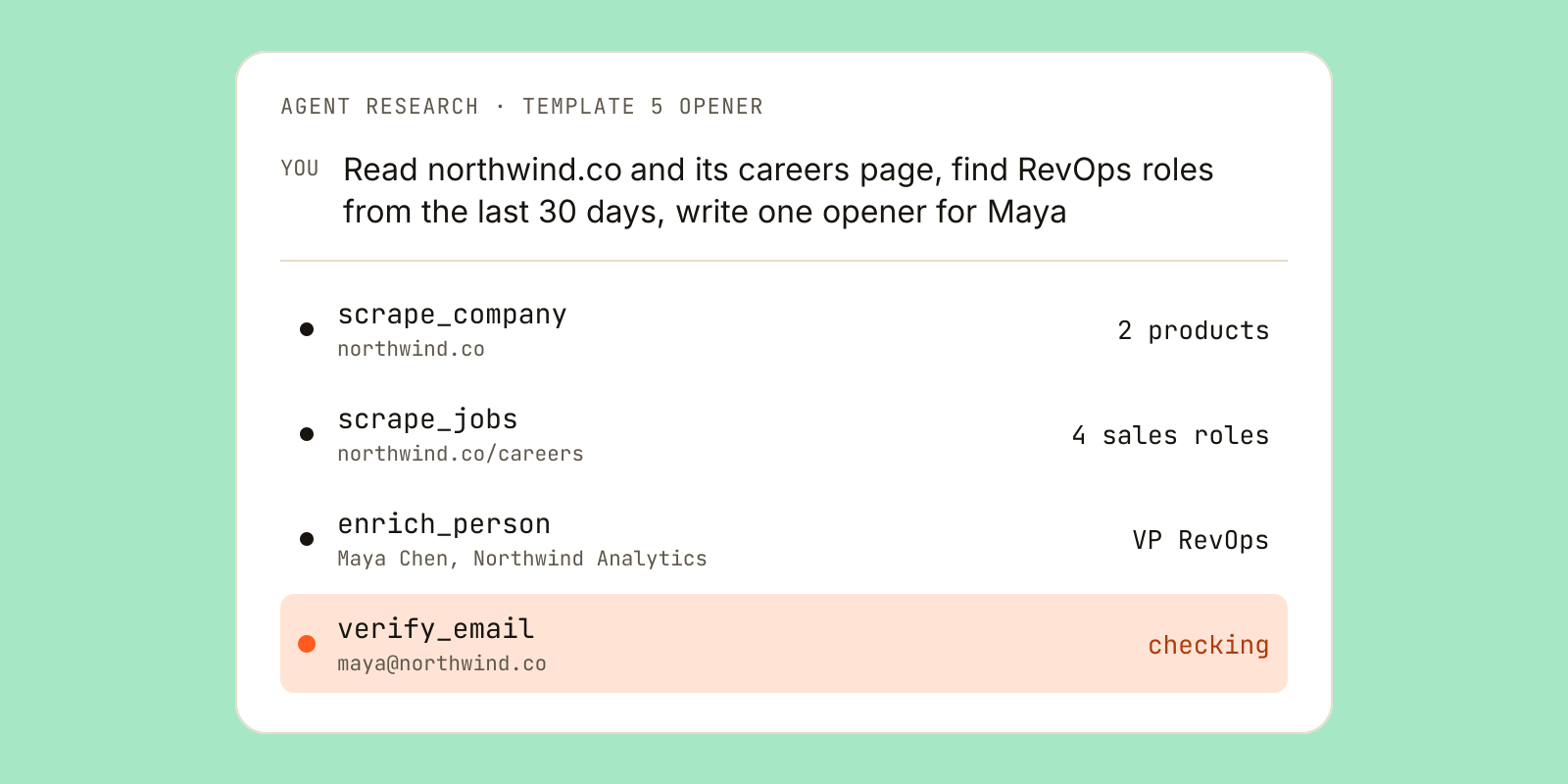
Doing this by hand for every prospect is slow, which is why many teams have an AI agent do the research step. Leadsets is a B2B data API and remote MCP server that gives agents like Claude or ChatGPT people and company search, verified work emails and company website scraping. Its scrape_company tool turns a homepage into products, positioning and customers named, and scrape_jobs turns a careers page into open roles with titles and dates. You can see all eight tools on the Leadsets page for AI agents. A prompt for Templates 3, 5 and 6 looks like this:
Read northwind.co and its careers page. Tell me what they sell, who
they sell to, and any sales or RevOps roles posted in the last 30 days,
with dates. Then write one true opening line for Maya Chen,
VP Revenue Operations. Quote the source for every claim.
What it costs: scraping uses one scrape unit per page read, and units are an add-on on paid plans (packs start at $9 for 1,000 units). Scraping is not on the free plan. What can go wrong: careers pages lag behind reality, so check the posted date, and read the opening line yourself before it goes out. If you are choosing tools for each stage of this process, the post on sales prospecting tools by job covers how they fit together.
Before you send: list and compliance checks
The best template fails if it bounces. Run these checks before any sequence goes live.
- Verify every address. Remove invalid emails. A high bounce rate damages your sending reputation for every future email.
- Separate catch-alls. A catch-all domain accepts mail for any address, so nobody can confirm the mailbox exists. Send to these at lower volume rather than mixing them in. Read what a catch-all email is for the detail.
- Treat unknown as unconfirmed. If a mail server gives no clear answer, do not count that address as safe.
- Replace role addresses. info@ and sales@ inboxes rarely reach the person in your template. Find the named owner instead.
- Follow the law that applies to you. Include a clear way to opt out, honour unsubscribes and keep your own suppression list. Rules such as CAN-SPAM, GDPR and CASL differ by country, so read up on whether cold email is legal where your readers are.
In Leadsets, verify_email returns one of four labels (verified, catch-all, unknown or invalid) with a confidence score, and uncertain results are never rounded up to valid. Emails returned by enrich_person are already verified.
Start with one template, one segment and one honest reason for now. Measure replies, rewrite the weakest line, and only then add the next template.
Questions and answers
How long should a B2B cold email be?
Short enough to read on a phone without scrolling, usually three or four short paragraphs. Each email should cover one problem and one ask. Anything longer tends to read like a brochure rather than a message from a person.
How many follow-ups should a cold email sequence have?
Many B2B teams plan a first touch, two or three follow-ups and a breakup email, spaced a few business days apart. Each follow-up should add something new, such as a useful tip or a different angle. Once you send the breakup email, stop.
What makes a good cold email subject line?
Short, specific and plain, often lowercase, so it looks like a note from a colleague. Refer to the reader's business or the reason you are writing, such as a hiring post or launch. Avoid fake reply prefixes, all caps and urgency words.
Should I use the same cold email template for every prospect?
Use the same structure, but change the reason for now and the opening line for each segment or person. A template with one true, recent detail about the reader usually beats a generic version. Group prospects by trigger, such as new leaders or companies hiring SDRs, and use the matching template.
What is a breakup email in sales?
A breakup email is the last message in a cold sequence, telling the prospect you will stop reaching out. It closes the loop politely and invites them to reply if things change. It only works if you actually stop afterwards.
Do I need to verify emails before using cold email templates?
Yes. Sending to invalid addresses causes hard bounces, which hurt your sender reputation and the delivery of every later email. Remove invalid addresses, send to catch-all addresses at lower volume and treat unknown results as unconfirmed.
Go deeper
- Email verificationVerified, catch-all, unknown or invalid, with confidence
- How our data is madeSources, freshness and the verification waterfall
- Limits and costsWhat verify_email and enrichment use